
Property valuations
How to choose an online house valuation tool
Typing your address into an online valuation tool takes seconds, and two tools can return very different figures for the same home. Rather than chasing the highest number, compare how each tool reaches its figure, how much it shows you and what it does with your details.
This is an estimate from comparable sales, not a RICS or mortgage valuation, and not a survey.
Why two tools give different figures
Online valuation tools are calculations, and different calculations use different evidence. One may rely on asking prices, another on completed sales. One may use the floor area recorded for your home, another may guess from the number of bedrooms. They also update at different times. So a difference between two tools is not a mystery to be split down the middle. It is a sign that they are looking at different evidence, and the checks below show you which evidence to prefer. For the background, see how automated house valuations work and how accurate online house valuations are.
Check 1: does it show the sales behind the figure?
The strongest evidence for a home's value is what similar homes nearby actually sold for, recently. A tool that lists the sales it used, with their prices and dates, lets you judge them. A tool that shows none asks you to take its word for it. Prefer completed sales to asking prices, and look at the dates: HM Land Registry says a sale typically takes from 2 weeks to 2 months to be registered. Our guide to using sold house prices explains what to look for.
Check 2: which property details does it use?
Size drives most estimates. Many tools take the floor area from the home's energy certificate, which may predate an extension or a conversion. Check which details a tool has used and whether you can correct them. If a tool has your home as a smaller house type or the wrong number of bedrooms, the figure will follow the mistake. See what to do when property details are wrong.
Check 3: does it give a range, and say how sure it is?
A single figure looks precise but hides uncertainty. A range shows how much the evidence agrees. A wide range is honest when there are few comparable sales, so treat it as information, not as a fault.
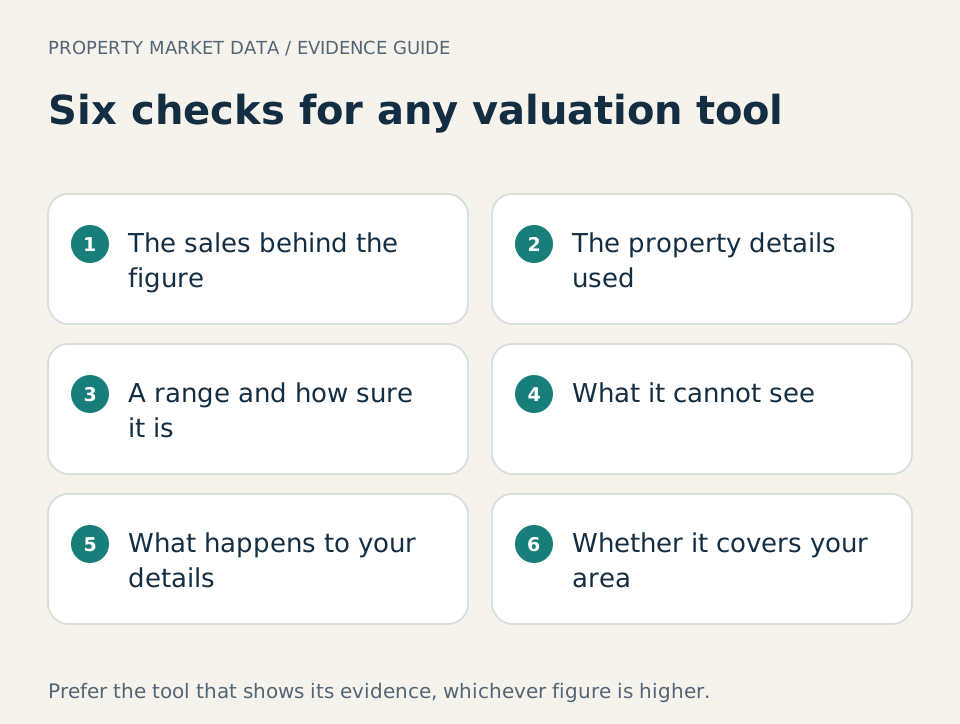
Check the sales behind the figure, the property details used, the range and how sure it is, what the tool cannot see, what happens to your details and whether it covers your area.
Check 4: does it say what it cannot see?
No online tool sees your home. Condition, light, layout, noise and any work done or needed are invisible to a calculation unless you describe them. A careful tool says so plainly. The surveyors' professional body makes the same point in its roadmap on automated valuation models: a figure is more useful when the user can see how it was reached and where it should not be relied on alone. Our guide to how property condition affects a valuation covers what a calculation misses.
Check 5: what happens to your details?
Some tools are free because they are a way for estate agents to find sellers. You may be asked for a phone number before you see a figure. Marketing by phone, email and text is covered by the Privacy and Electronic Communications Regulations, which the Information Commissioner's Office explains. Read the privacy notice first, and see online valuations and unwanted sales calls.
Check 6: does it cover your area?
Sold price records differ across the four nations. HM Land Registry's Price Paid Data covers England and Wales, so a tool built on it may not cover a home elsewhere. Check the stated coverage before you rely on a figure.
Compare tools with a simple scorecard
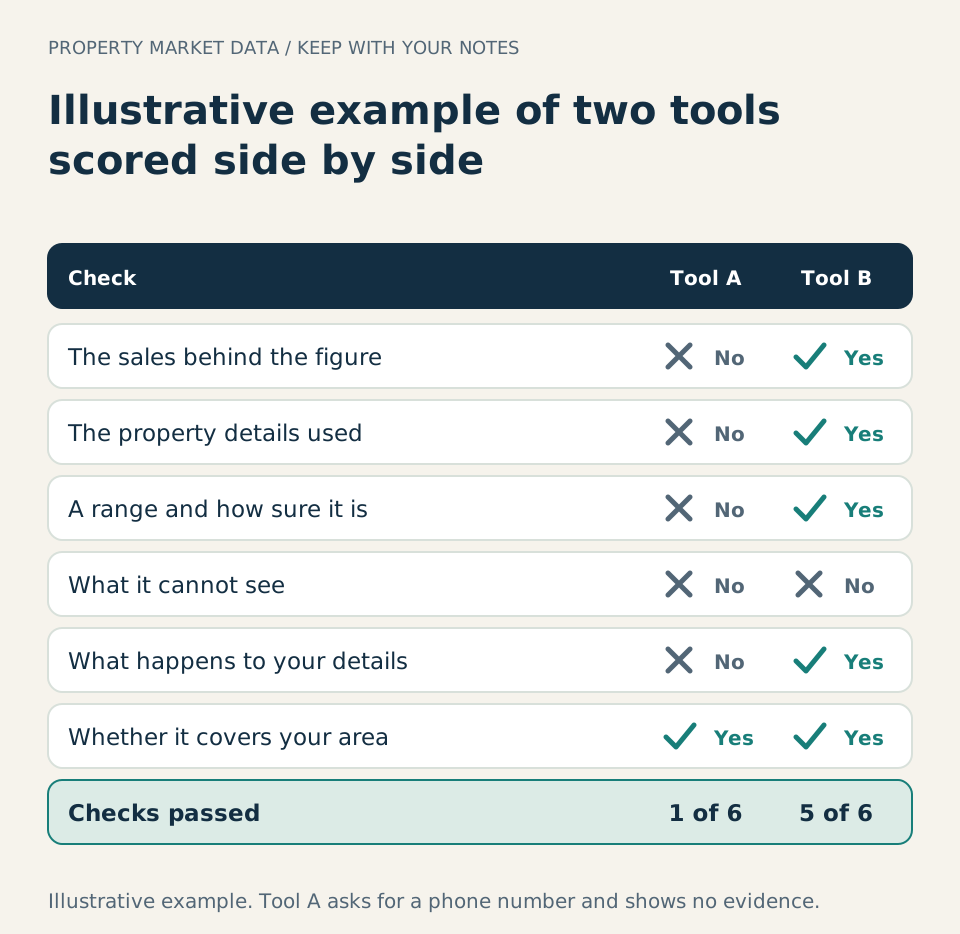
Score each tool you try against the six checks. In the Illustrative example below, the tool with the plainer figure asks for a phone number and shows no evidence, while the other lists its sales and shows a range. The second is the one to rely on, whichever figure is higher.
 Illustrative example
Illustrative example: tool A shows a figure only and asks for a phone number; tool B lists its sales with dates, uses the certificate floor area and shows a range. Tool B passes five of the six checks.
How PMD's report sets out its evidence
A PMD report is built to be checked in this way. It lists the comparable sales it used, restates older sales to today's prices with the official index, says whether the floor area came from a certificate or from you, and gives a range with a confidence reading. The estimate is PMD's own calculation, tested against thousands of recorded sales, and the report says what the data cannot tell you. It covers homes in England and Wales. It is not a RICS valuation or a survey.
Sources
- HM Land Registry, About the Price Paid Data: Sold price records cover England and Wales and arrive after a delay
- GOV.UK, Find an energy certificate: Checking the floor area recorded for a home
- Royal Institution of Chartered Surveyors, Automated valuation models roadmap: Explaining how an automated figure was reached and where models have limits
- Information Commissioner's Office, Guide to PECR: The rules on marketing by phone, email and text